
What is Hosting

Hosting refers to the service of providing storage space and access for websites on the internet. When you create a website, all the files, images, and data associated with it need to be stored somewhere so that people can access them when they visit your site. This storage is provided by a web hosting service.
Table of Contents
Here’s how it works:
- Web Server: The hosting service stores your website’s files on a powerful computer called a server. This server is always connected to the internet.
- Domain Name: When someone types your website’s domain name into their browser, the browser connects to the server where your website is hosted.
- Data Transfer: The server sends the requested files (like images, text, and code) back to the user’s browser, allowing them to view your website.
What is Difference between Shared and VPS and Dedicated Hosting
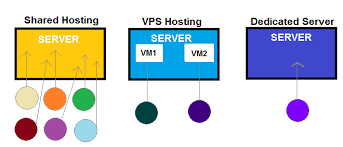
The main differences between Shared, VPS (Virtual Private Server), and Dedicated Hosting lie in the level of control, performance, cost, and the way server resources are allocated. Here’s a breakdown of each:
1. Shared Hosting
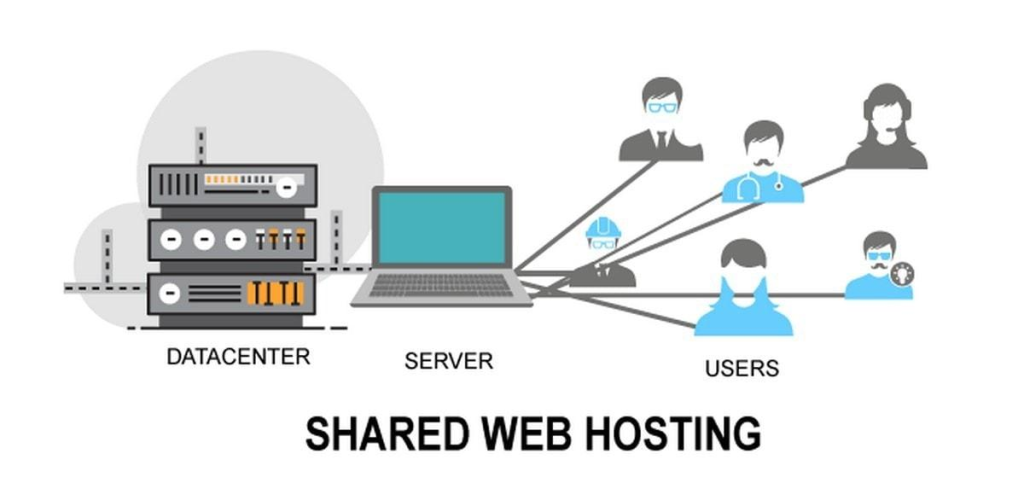
- Resource Allocation: Multiple websites are hosted on the same server, sharing the server’s resources (CPU, RAM, bandwidth, etc.).
- Control: Limited control over server settings since many users share the same environment.
- Performance: Performance can be affected by other websites on the same server, especially if one site uses excessive resources (often called the “noisy neighbor” effect).
- Cost: Most affordable option, making it ideal for small websites or beginners.
- Scalability: Limited scalability. As your website grows, you might outgrow shared hosting.
- Security: Basic security measures are in place, but the shared environment poses a higher risk.
Ideal For: Personal blogs, small businesses, or websites with low traffic.
2. VPS Hosting (Virtual Private Server)
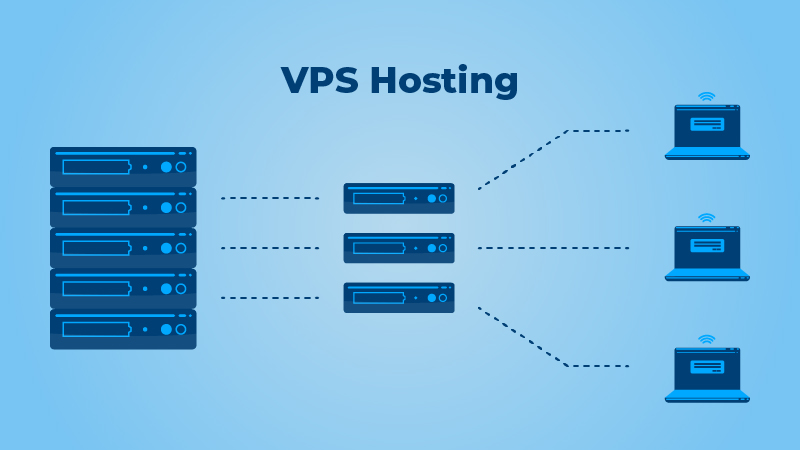
- Resource Allocation: The server is partitioned into multiple virtual servers. Each VPS acts like a dedicated server with allocated resources that aren’t shared with other users.
- Control: More control and customization options. You have root access, allowing you to install custom software and manage server settings.
- Performance: Better performance compared to shared hosting. Resources are guaranteed, so other users on the same physical server won’t impact your website.
- Cost: More expensive than shared hosting but cheaper than dedicated hosting. It’s a middle-ground option.
- Scalability: Easily scalable by upgrading your VPS plan as your website grows.
- Security: Improved security compared to shared hosting, as each VPS is isolated from others.
Ideal For: Growing websites, e-commerce sites, or users who need more control over their hosting environment.
3. Dedicated Hosting

- Resource Allocation: You get an entire physical server dedicated solely to your website. No sharing of resources with others.
- Control: Full control over the server. You can configure the server exactly as you need, including hardware and software choices.
- Performance: Superior performance, as all server resources are dedicated to your website. This is ideal for high-traffic websites or resource-intensive applications.
- Cost: Most expensive option. The cost reflects the exclusive use of the server and the higher level of service.
- Scalability: Highly scalable in terms of performance, but adding more physical resources (like additional servers) can be costly.
- Security: Highest level of security, as the server is isolated from others. You can implement custom security measures.
Ideal For: Large businesses, high-traffic websites, or applications that require maximum performance and security.
Summary:
- Shared Hosting is economical but comes with shared resources and limited control.
- VPS Hosting offers a balance of control, performance, and cost, with dedicated resources within a virtual environment.
- Dedicated Hosting provides the highest level of performance and control, with an entire server dedicated to your website, but at a higher cost.
Choosing the right hosting depends on your website’s size, traffic, technical requirements, and budget.
Which hosting is suitable for Java and .NET applications?
When it comes to hosting for Java and .NET applications, the requirements differ slightly based on the nature of these technologies. Here’s a breakdown of which hosting types are suitable:
Java Hosting
Java applications often require specific environments like Apache Tomcat or JBoss, as well as the Java Runtime Environment (JRE) or Java Development Kit (JDK).
- VPS Hosting:
- Suitability: VPS hosting is well-suited for Java applications because it provides the control needed to install and configure the necessary environments and software, such as Apache Tomcat or JBoss.
- Customization: You can configure the server to meet the specific needs of your Java application, including memory allocation and garbage collection settings.
- Performance: VPS offers better performance for Java applications, which are typically more resource-intensive.
- Dedicated Hosting:
- Suitability: Ideal for large or resource-intensive Java applications. Dedicated hosting gives you full control over the server, allowing you to fine-tune it for optimal Java performance.
- Performance: Since Java applications can be demanding, dedicated hosting ensures that your application has access to all the server resources, which can be crucial for performance and scalability.
- Shared Hosting:
- Suitability: Not typically recommended for Java applications. Shared hosting environments often do not support Java out of the box, and even when they do, performance and customization options are limited.
.NET Hosting
.NET applications, particularly those built with ASP.NET, often require a Windows-based hosting environment to run effectively.
- VPS Hosting:
- Suitability: VPS hosting with Windows Server is a good option for .NET applications. It allows you to install and manage the necessary .NET frameworks, IIS (Internet Information Services), and other related services.
- Customization: Offers more control over server settings, making it easier to configure IIS and optimize your .NET application.
- Performance: Better suited for growing .NET applications that need more resources and better performance.
- Dedicated Hosting:
- Suitability: Best for large-scale .NET applications, especially if they handle significant traffic or have high performance and security requirements.
- Performance: With a dedicated server, you can fully optimize the environment for your .NET applications, ensuring maximum performance and reliability.
- Shared Hosting:
- Suitability: Some shared hosting plans offer Windows hosting with support for ASP.NET, but they are typically limited in performance and control.
- Performance: Suitable for small .NET applications or websites with low traffic, but as the application grows, shared hosting might become insufficient.
Summary
- Java Applications: VPS or Dedicated Hosting is recommended, depending on the application’s size and resource needs.
- .NET Applications: VPS or Dedicated Hosting with a Windows environment is ideal, with Shared Hosting being a possible option for smaller projects.
If you’re developing or hosting applications in either of these languages and need more control, performance, and the ability to customize the server environment, VPS Hosting is a strong starting point, with Dedicated Hosting being the best choice for larger or more critical applications.