
What is DKIM?
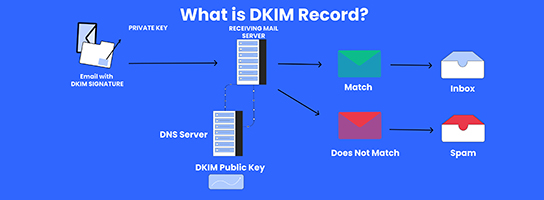
DKIM (DomainKeys Identified Mail) is an email authentication method that helps verify the authenticity of email messages. It works by adding a digital signature to outgoing emails, which is then verified by receiving email servers using a public key published in the sender’s DNS records. This verification process helps prevent email spoofing and ensures the integrity of email communications.
Table of Contents
What is required for a DKIM signature?

For a DomainKeys Identified Mail signature to be generated and verified successfully, several components are required:
- Domain Key: Each domain that implements DomainKeys Identified Mail needs to generate a unique domain key pair consisting of a private key and a public key.
- Private Key: The private key is kept confidential and used by the sending mail server to generate the DomainKeys Identified Mail signature for outgoing emails. It is crucial to safeguard the private key to prevent unauthorized parties from generating fraudulent DKIM signatures.
- Public Key: The public key is published in the domain’s DNS records as a TXT record. It is used by receiving mail servers to verify the DomainKeys Identified Mail signature on incoming emails. The public key allows recipients to confirm that the email was indeed sent from the claimed domain and that the message has not been altered during transmission.
- Selector: The DomainKeys Identified Mail signature includes a selector, which is a unique identifier chosen by the sender. It helps distinguish between different sets of keys that may be used for DKIM signing. The selector is included in the DomainKeys Identified Mail signature header and is used by receiving servers to retrieve the corresponding public key from the domain’s DNS records.
- Hash Algorithm: DomainKeys Identified Mail signatures are generated using a cryptographic hash algorithm, typically SHA-256 or SHA-1. The hash algorithm is specified in the DKIM signature header and is used to generate a unique hash value for the email message content, which is then encrypted using the private key to create the signature.
- Headers to Sign: The sender can specify which email headers should be included in the DKIM signature. Typically, DKIM signs specific headers like From, To, Subject, Date, and MIME-Version. By signing these headers, DKIM provides assurance that they have not been tampered with in transit.
- Canonicalization Algorithm: DKIM employs canonicalization algorithms to ensure consistent handling of email message content across different email systems. There are two canonicalization algorithms: “simple” and “relaxed,” each with its own rules for normalizing and formatting email headers and body.
What are the benefits of DomainKeys Identified Mail
DomainKeys Identified Mail (DomainKeys Identified Mail) offers several benefits for both senders and recipients of email:
- Email Authentication: DomainKeys Identified Mail provides a mechanism for verifying the authenticity of email messages. By digitally signing outgoing emails, DKIM enables receiving mail servers to verify that the messages come from the claimed sender and have not been altered in transit. This helps combat email spoofing and phishing attacks, enhancing overall email security.
- Improved Deliverability: Email providers often use DomainKeys Identified Mail as one of the factors in determining the legitimacy of incoming emails. Messages that are DKIM-signed are more likely to bypass spam filters and reach recipients’ inboxes, improving deliverability rates for legitimate senders.
- Brand Protection: DomainKeys Identified Mail helps protect the reputation and integrity of sender domains. By authenticating emails with DKIM signatures, organizations can mitigate the risk of their domains being used for fraudulent activities, such as phishing scams. This builds trust with recipients and preserves the sender’s brand reputation.
- Message Integrity: DomainKeys Identified Mail ensures that the content of email messages remains intact and has not been tampered with during transmission. Recipients can verify the DKIM signature to confirm that the email has not been modified since it was sent, enhancing trust in the integrity of the communication.
- Compliance: DomainKeys Identified Mail is often a requirement for compliance with email authentication standards such as DMARC (Domain-based Message Authentication, Reporting, and Conformance). Implementing DKIM helps organizations meet these standards and demonstrate a commitment to email security best practices.
How to create a DomainKeys Identified Mail Records For a Domain?

To create a DKIM (DomainKeys Identified Mail) record for your domain, you’ll typically follow these steps:
- Generate DomainKeys Identified Mail Keys: You need to generate a public-private key pair for DKIM. This can usually be done through your email service provider or by using a DomainKeys Identified Mail key generation tool.
- Publish the Public Key in DNS: Once you have generated the keys, you need to publish the public key as a DNS TXT record for your domain. This involves accessing your domain’s DNS settings through your domain registrar or hosting provider’s control panel.
- Formatting the DomainKeys Identified Mail Record: The DomainKeys Identified Mail record typically looks like this:
selector._domainkey.yourdomain.com IN TXT “v=DKIM1; k=rsa; p=MIGfMA0GCSqGSIb3DQEBAQUAA4GNADCBiQKBgQ…”
- Replace “selector” with the selector you chose when generating the DKIM keys.
- Replace “yourdomain.com” with your actual domain name.
- Replace the long string starting with “MIGfMA0GCSqGSIb3DQEBAQUAA4GNADCBiQKBgQ…” with your DomainKeys Identified Mail public key.